

Validating an ABN or ACN inside Power Automate is a simple way to strengthen data accuracy in your workflows. By calling the Australian Business Register (ABR) API, you can confirm business identifiers before storing or processing them.
To get started, you’ll need an authentication GUID, which you can register for through the ABR site. Fill out the form on the page. Usually, it takes 1-2 days for your request to get approved.
Once you have the GUID, add an HTTP action in your flow. Set the method to GET and use the below URL format:
https://abr.business.gov.au/json/AbnDetails.aspx?abn=<abn-number-to-search-for>&guid=<your-authentication-guid>&callback=callback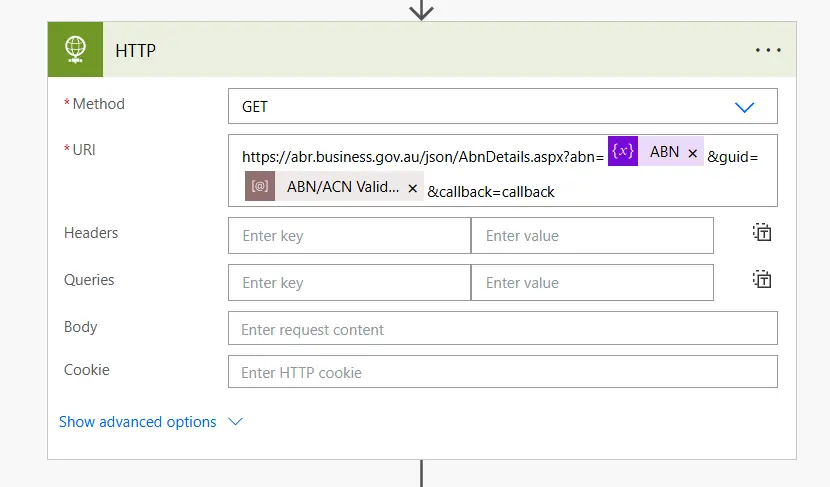
The ABR endpoint returns JSONP, not plain JSON. This means your response will be wrapped in a callback function, for example:
callback({"Abn":"12345678926", ... })Since Power Automate can’t parse JSONP directly, extract the raw JSON using a substring expression. The following formula trims off the callback( wrapper and trailing parenthesis:
substring(
  string(body('HTTP')),
  length('callback('),
  sub(
    length(string(body('HTTP'))),
    add(length('callback('), 1)
  )
)This gives you clean JSON that you can feed into a standard Parse JSON action. From there, you can validate the ABN/ACN, branch your logic, or store the data as needed.
If the ABN is valid, the API returns full business details; if not, it will return the response fields as null or blank.canv
You can also search using an ACN or a business name. More details on supported endpoints and fields are available in the ABR documentation.